For SAP Business One

Expenses figured out for SAP Business One

Snap a receipt, let OCR fill in the details, group expenses into reports — and post reimbursables straight to SAP Business One as A/R invoices. No manual entry.
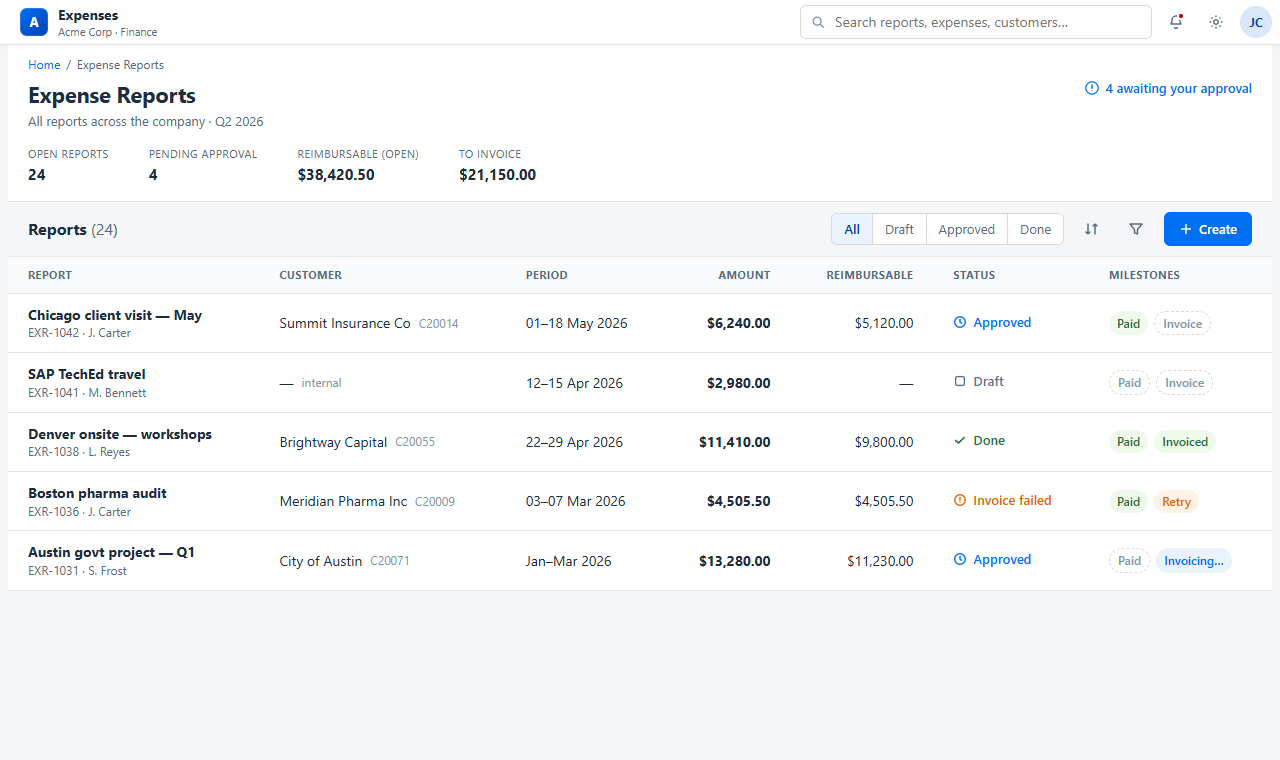
app.b1expense.com/reports
B1 Expense reports dashboard with SAP invoice status
Receipt OCR
Autofilled in 2s
A/R invoice
DocNum 100482 ✓
Built on enterprise-grade infrastructure
Cloudflare SAP Business One Workers AI D1 & R2
The problem

Expense admin shouldn't mean SAP data entry

Finance teams lose hours keying receipts and re-billing client costs by hand. B1 Expense closes the gap between the receipt in someone's pocket and the invoice in SAP.

Manual data entry

Receipts retyped into SAP line by line — slow, error-prone, and impossible to audit cleanly.

Lost client re-bills

Reimbursable costs that should land on a customer A/R invoice slip through the cracks.

Approval limbo

Spreadsheets and email threads with no clear status, no audit trail, and no SAP connection.

How it works

From receipt to SAP in four steps

Every expense follows one clean path — capture, group, approve, post. The app owns the workflow; SAP just receives the finished invoice.

1

Capture

Photograph a receipt on your phone. Workers AI reads the vendor, amount, currency and date — you just confirm.

2

Group

Bundle expenses into a report, attach a customer, and split costs across reports when one receipt serves several jobs.

3

Approve

An approver signs off (never their own report). Paid and Invoiced are tracked as separate milestones, fully audited.

4

Post to SAP

Reimbursables post to SAP Business One as a grouped A/R invoice — with a branded combined-PDF of every receipt attached.

Features

Everything finance needs, nothing it doesn't

Purpose-built for SAP Business One shops — not a generic expense tool bolted on afterwards.

Receipt OCR autofill

Vision AI extracts amount, currency, date and vendor from a photo. Confirm and move on.

Reports & splits

Group expenses into reports and allocate one receipt across multiple jobs or customers.

Multi-currency

Capture in any currency with a base-currency rollup, and invoice in the customer's currency.

Role-based approvals

Approver, finance-pay and finance-invoice rights, with no self-approval and a full audit log.

Reimbursable vs prepaid

Flag what's billable to a customer and what the company absorbs, so only the right costs hit the invoice.

SAP master-data sync

Customers and items sync nightly from SAP, so dropdowns and postings always use real codes.

SAP integration

A direct line to SAP Business One — over a secure tunnel

B1 Expense talks to your on-prem Service Layer through a Cloudflare Tunnel. No open inbound ports, no VPN, no SAP add-on to install.

Grouped A/R invoices
One invoice per report, a line per reimbursable category mapped to your SAP service items.
Attachment built in
The combined receipt PDF is uploaded and linked to the invoice automatically.
Reliable & idempotent
Queued posting with retries survives tunnel blips and never double-posts a report.
Service Layer only
Standard SAP Business One Service Layer API — works with HANA or SQL Server, single company DB.
B1 Expense
Cloudflare Worker · D1 · R2
— encrypted Cloudflare Tunnel —
SAP Business One Service Layer
On-prem · /Invoices · /Attachments2
Standout feature

Every receipt, attached to the SAP invoice

When a report is invoiced, B1 Expense merges a branded cover sheet and every reimbursable receipt into a single PDF — then uploads and links it to the A/R invoice in SAP Business One. Your customers and auditors see the full backup right inside SAP.

Branded cover sheet with itemized totals
All reimbursable receipts merged into one PDF
Uploaded & linked via SAP Service Layer
No more hunting for paper backup at audit
Expense report
Chicago client visit — May
CustomerSummit Insurance Co
Period01–18 May 2026
Airfare — United$1,840.00
Hotel — 4 nights$1,520.00
Meals & client dinner$980.00
Ground transport$780.00
Reimbursable total$5,120.00
Cover sheet + 8 receipts · 9 pages
Attached in SAP Business One
A/R Invoice · DocNum 100482
Security & trust

Your SAP stays where it is

B1 Expense runs on Cloudflare's global edge and reaches your SAP server through a zero-trust outbound tunnel — nothing is exposed to the public internet.

No open ports

The Cloudflare Tunnel makes an outbound-only connection. Your firewall stays closed.

Magic-link auth

Passwordless, single-use sign-in links. Sessions are short-lived and revocable.

Full audit log

Every approval, payment and SAP posting is recorded with who, what and when.

Pricing

Simple pricing, scoped to your SAP Business One

Pricing scales with your team. Every plan includes the SAP integration, OCR, and combined-PDF attachments.

Starter

$50 /mo

For small teams getting expenses out of spreadsheets.

  • Up to 10 users
  • Receipt OCR & reports
  • SAP A/R invoice posting
  • Email support
Book a demo
Most popular

Business

$100 /mo

For growing finance teams re-billing client costs.

  • Up to 50 users
  • Everything in Starter
  • Multi-currency & splits
  • Priority support
Book a demo

Enterprise

Custom

For multi-entity SAP landscapes and custom needs.

  • Unlimited users
  • Dedicated tunnel & SLA
  • Onboarding & setup
  • Custom integrations
Contact sales
FAQ

Questions SAP teams ask first

Do we need to install an SAP add-on?

No. B1 Expense talks to the standard SAP Business One Service Layer — nothing is installed inside your SAP system, and there's no add-on to maintain through upgrades.

Does it work with SAP HANA and SQL Server?

Yes. Because it uses the Service Layer API, B1 Expense is database-agnostic — it works the same whether your company database runs on SAP HANA or Microsoft SQL Server.

Is our SAP server exposed to the internet?

No. The connection runs through a Cloudflare Tunnel that makes an outbound-only connection from your network. No inbound ports are opened and no VPN is required.

What exactly does it post to SAP?

Only customer A/R invoices for reimbursable costs, with the combined-PDF receipt pack attached. B1 Expense never touches accounts payable, journal entries, or any cost-side posting.

How are employees reimbursed?

B1 Expense tracks the Paid milestone and timestamp; the actual payout runs through your existing payroll provider. Paid and Invoiced are tracked independently, so client re-billing never waits on reimbursement.

Where is our data stored?

Receipts and reports live on Cloudflare's infrastructure (D1 and R2). Your SAP data stays in SAP — B1 Expense reads master data and writes invoices, but your system of record never moves.

See your receipts land in SAP

Book a 20-minute demo and we'll post a live expense report to a SAP Business One A/R invoice — receipts attached.